실습 목표
CloudFormation을 이용하여 3-Tier Architecture 인프라를 자동 생성한다.
구성되는 인프라는 다음과 같다.
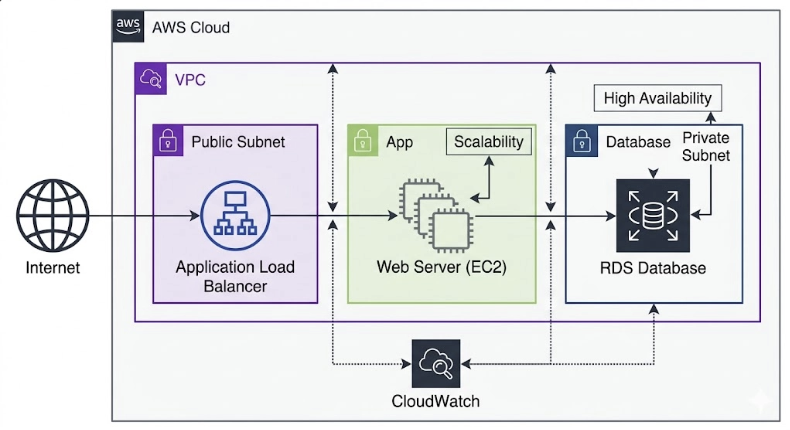 CloudFormation Template을 이용하여 다음 리소스를 생성한다.
- VPC
- Public Subnet
- Private Subnet
- Internet Gateway
- Route Table
- Security Group
- EC2 Instance
- Application Load Balancer
- RDS Database
1. CloudFormation Template 작성
파일 생성
three-tier-template.yaml
1.1 Template 기본 구조
CloudFormation Template 기본 구조
AWSTemplateFormatVersion
Description
Parameters
Resources
Outputs
2. Parameter 설정
Parameter는 Template 실행 시 입력값을 받기 위한 변수이다.
Parameters:

  InstanceType:
    Type: String
    Default: t3.micro

  DBUsername:
    Type: String
    Default: admin

  DBPassword:
    Type: String
    NoEcho: true

  VpcCIDR:
    Type: String
    Default: 10.0.0.0/16
Parameter 설명
| Parameter | 설명 |
|---|---|
| InstanceType | EC2 인스턴스 타입 |
| DBUsername | RDS 사용자 |
| DBPassword | RDS 비밀번호 |
| VpcCIDR | VPC CIDR |
3. VPC 생성
Resources:

  VPC:
    Type: AWS::EC2::VPC
    Properties:
      CidrBlock: !Ref VpcCIDR
      Tags:
        - Key: Name
          Value: 이니셜-vpc-cf
4. Subnet 생성
Public Subnet
PublicSubnet:
  Type: AWS::EC2::Subnet
  Properties:
    VpcId: !Ref VPC
    CidrBlock: 10.0.1.0/24
    AvailabilityZone: ap-northeast-2a
Private Subnet
PrivateSubnet:
  Type: AWS::EC2::Subnet
  Properties:
    VpcId: !Ref VPC
    CidrBlock: 10.0.2.0/24
    AvailabilityZone: ap-northeast-2a
5. Internet Gateway 생성
InternetGateway:
  Type: AWS::EC2::InternetGateway
VPC 연결
AttachGateway:
  Type: AWS::EC2::VPCGatewayAttachment
  Properties:
    VpcId: !Ref VPC
    InternetGatewayId: !Ref InternetGateway
6. Security Group 생성
Web Server Security Group
WebSecurityGroup:
  Type: AWS::EC2::SecurityGroup
  Properties:
    GroupDescription: web sg
    VpcId: !Ref VPC
    SecurityGroupIngress:

      - IpProtocol: tcp
        FromPort: 80
        ToPort: 80
        CidrIp: 0.0.0.0/0
7. EC2 Web Server 생성
WebServer:
  Type: AWS::EC2::Instance
  Properties:
    InstanceType: !Ref InstanceType
    ImageId: ami-xxxxxxxx
    KeyName: !Ref KeyName
    SubnetId: !Ref PublicSubnet
    SecurityGroupIds:
      - !Ref WebSecurityGroup
    Tags:
      - Key: Name
        Value: 이니셜-ec2-web-cf
8. Application Load Balancer 생성
LoadBalancer:
  Type: AWS::ElasticLoadBalancingV2::LoadBalancer
  Properties:
    Name: 이니셜-alb-cf
    Subnets:
      - !Ref PublicSubnet
      - !Ref PrivateSubnet
Target Group
TargetGroup:
  Type: AWS::ElasticLoadBalancingV2::TargetGroup
  Properties:
    Port: 80
    Protocol: HTTP
    VpcId: !Ref VPC
Listener
Listener:
  Type: AWS::ElasticLoadBalancingV2::Listener
  Properties:
    LoadBalancerArn: !Ref LoadBalancer
    Port: 80
    Protocol: HTTP
    DefaultActions:
      - Type: forward
        TargetGroupArn: !Ref TargetGroup
9. RDS Database 생성
Database:
  Type: AWS::RDS::DBInstance
  Properties:
    DBInstanceClass: db.t3.micro
    Engine: mysql
    AllocatedStorage: 20
    MasterUsername: !Ref DBUsername
    MasterUserPassword: !Ref DBPassword
    VPCSecurityGroups:
      - !Ref WebSecurityGroup
10. Output 설정
Output은 Stack 생성 후 결과값을 출력하는 기능이다.
Outputs:

  VPCID:
    Description: VPC ID
    Value: !Ref VPC

  WebServerPublicIP:
    Description: Web Server Public IP
    Value: !GetAtt WebServer.PublicIp

  LoadBalancerDNS:
    Description: ALB DNS
    Value: !GetAtt LoadBalancer.DNSName
11. CloudFormation Stack 생성
다음 메뉴 이동
AWS Console
→ CloudFormation
→ Stack 생성
Template 업로드
three-tier-template.yaml
12. Parameter 입력
Stack 생성 시 다음 값 입력
InstanceType : t3.micro
DBUsername : admin
DBPassword : password123
VpcCIDR : 10.0.0.0/16
Stack 이름
이니셜-stack-3tier
Stack 생성
13. Stack 생성 확인
다음 상태 확인
CREATE_COMPLETE
생성된 리소스 확인
이니셜-vpc-cf
이니셜-ec2-web-cf
이니셜-alb-cf
RDS
14. Output 확인
CloudFormation 콘솔
Stack
→ Outputs
출력 값
VPCID
WebServerPublicIP
LoadBalancerDNS
15. Web Service 접속
브라우저 접속
<http://LoadBalancerDNS>
Parameter / Output 개념 정리
Parameter
Parameter는 CloudFormation Template 실행 시 입력받는 변수이다.
예시
Parameters:

  InstanceType:
    Type: String
    Default: t3.micro
사용
InstanceType: !Ref InstanceType장점
- Template 재사용 가능
- 환경별 설정 변경 가능
- 보안 정보 입력 가능
Output
Output은 Stack 실행 결과 값을 출력하는 기능이다.
예시
Outputs:

  WebServerIP:
    Value: !GetAtt WebServer.PublicIp
활용
- Stack 결과 확인
- 다른 Stack에서 참조
- 자동화 스크립트 연동
정리
실습에서 수행한 작업
- CloudFormation Parameter 설정
- VPC 인프라 생성
- EC2 Web Server 생성
- ALB 생성
- RDS 생성
- Output 출력
CloudFormation을 이용하면 다음이 가능하다.
- 인프라 자동 구축
- 동일 환경 재현
- Dev / Test / Prod 환경 관리
- 대규모 인프라 자동화
CloudFormation 3-Tier Architecture Template (완성본)
파일 이름
three-tier-template.yaml
AWSTemplateFormatVersion: '2010-09-09'

Parameters:
  InstanceType:
    Type: String
    Default: t3.micro

  DBUsername:
    Type: String
    Default: admin

  DBPassword:
    Type: String
    NoEcho: true

  VpcCIDR:
    Type: String
    Default: 172.16.0.0/16

Resources:
  # --- VPC 및 네트워크 설정 ---
  VPC:
    Type: AWS::EC2::VPC
    Properties:
      CidrBlock: !Ref VpcCIDR
      EnableDnsSupport: true
      EnableDnsHostnames: true
      Tags:
        - Key: Name
          Value: kyt-vpc-cf

  PublicSubnet:
    Type: AWS::EC2::Subnet
    Properties:
      VpcId: !Ref VPC
      CidrBlock: 172.16.1.0/24
      AvailabilityZone: ap-northeast-2a
      MapPublicIpOnLaunch: true
      Tags:
        - Key: Name
          Value: kyt-pub-sub-a

  PrivateSubnet:
    Type: AWS::EC2::Subnet
    Properties:
      VpcId: !Ref VPC
      CidrBlock: 172.16.2.0/24
      AvailabilityZone: ap-northeast-2c
      Tags:
        - Key: Name
          Value: kyt-pri-sub-c

  InternetGateway:
    Type: AWS::EC2::InternetGateway

  AttachGateway:
    Type: AWS::EC2::VPCGatewayAttachment
    Properties:
      VpcId: !Ref VPC
      InternetGatewayId: !Ref InternetGateway

  # 인터넷 연결을 위한 라우팅 테이블 (필수)
  PublicRouteTable:
    Type: AWS::EC2::RouteTable
    Properties:
      VpcId: !Ref VPC

  DefaultRoute:
    Type: AWS::EC2::Route
    DependsOn: AttachGateway
    Properties:
      RouteTableId: !Ref PublicRouteTable
      DestinationCidrBlock: 0.0.0.0/0
      GatewayId: !Ref InternetGateway

  PublicSubnetAssociation:
    Type: AWS::EC2::SubnetRouteTableAssociation
    Properties:
      SubnetId: !Ref PublicSubnet
      RouteTableId: !Ref PublicRouteTable

  # --- 보안 그룹 설정 ---
  WebSecurityGroup:
    Type: AWS::EC2::SecurityGroup
    Properties:
      GroupDescription: Allow HTTP
      VpcId: !Ref VPC
      SecurityGroupIngress:
        - IpProtocol: tcp
          FromPort: 80
          ToPort: 80
          CidrIp: 0.0.0.0/0

  DBSecurityGroup:
    Type: AWS::EC2::SecurityGroup
    Properties:
      GroupDescription: Allow MySQL from WebServer
      VpcId: !Ref VPC
      SecurityGroupIngress:
        - IpProtocol: tcp
          FromPort: 3306
          ToPort: 3306
          SourceSecurityGroupId: !Ref WebSecurityGroup

  # --- 컴퓨팅 및 데이터베이스 ---
  WebServer:
    Type: AWS::EC2::Instance
    Properties:
      InstanceType: !Ref InstanceType
      ImageId: ami-0bb8c0d387143b435 # Amazon Linux 2023 (Region check required)
      SubnetId: !Ref PublicSubnet
      SecurityGroupIds:
        - !Ref WebSecurityGroup
      Tags:
        - Key: Name
          Value: kyt-ec2-web-cf

  # RDS 전용 서브넷 그룹 (VPC 내 RDS 생성 시 필수)
  DBSubnetGroup:
    Type: AWS::RDS::DBSubnetGroup
    Properties:
      DBSubnetGroupDescription: Subnets for RDS Instance
      SubnetIds:
        - !Ref PublicSubnet
        - !Ref PrivateSubnet

  Database:
    Type: AWS::RDS::DBInstance
    Properties:
      DBInstanceIdentifier: kyt-db-cf
      DBInstanceClass: db.t3.micro
      Engine: mysql
      AllocatedStorage: 20
      MasterUsername: !Ref DBUsername
      MasterUserPassword: !Ref DBPassword
      DBSubnetGroupName: !Ref DBSubnetGroup
      VPCSecurityGroups:
        - !Ref DBSecurityGroup
      PubliclyAccessible: false

  # --- 로드 밸런싱 (ALB) ---
  LoadBalancer:
    Type: AWS::ElasticLoadBalancingV2::LoadBalancer
    Properties:
      Name: kyt-alb-cf
      Subnets:
        - !Ref PublicSubnet
        - !Ref PrivateSubnet # ALB는 최소 2개의 AZ 필요 (PrivateSubnet을 활용하거나 별도 Public 생성 필요)
      SecurityGroups:
        - !Ref WebSecurityGroup

  TargetGroup:
    Type: AWS::ElasticLoadBalancingV2::TargetGroup
    Properties:
      Port: 80
      Protocol: HTTP
      VpcId: !Ref VPC
      TargetType: instance
      Targets:
        - Id: !Ref WebServer

  Listener:
    Type: AWS::ElasticLoadBalancingV2::Listener
    Properties:
      LoadBalancerArn: !Ref LoadBalancer
      Port: 80
      Protocol: HTTP
      DefaultActions:
        - Type: forward
          TargetGroupArn: !Ref TargetGroup

Outputs:
  VPCID:
    Description: VPC ID
    Value: !Ref VPC

  WebServerPublicIP:
    Description: Web Server Public IP
    Value: !GetAtt WebServer.PublicIp

  LoadBalancerDNS:
    Description: ALB DNS
    Value: !GetAtt LoadBalancer.DNSName
정리
CloudFormation Template 구조
Template
 ├─ Parameters
 ├─ Resources
 └─ Outputs
실제 동작
Template 업로드
        ↓
Stack 생성
        ↓
Resources 생성
        ↓
Outputs 출력